Where to put a watermark on TikTok, Reels and Shorts
Keep the mark inside the area that Meta's Reels ad spec and YouTube's Shorts ad spec both leave clear: on a 1080 x 1920 frame, 907 px wide and 979 px tall, 42.8% of the frame. TikTok publishes its safe zone only as downloadable files, so check a TikTok video against those.
Published . Drafted with AI assistance and checked against the sources linked on this page. How we write our guides.
TikTok safe zone: what TikTok publishes
TikTok gives its safe zone for in-feed ads as downloadable files, not as percentages on the page. Its help article says The safe zone size is determined by the dimension (vertical, horizontal, or square), ad caption length, and any additional formats used
, and then points to the files (TikTok Auction In-Feed Ads, last updated June 2026 on the page). The same article recommends a vertical size of 9:16 and at least 540 x 960 pixels.
We state no TikTok margin, and our drawing shows none. Because the zone depends on caption length, we suggest you check your own video against TikTok's file for the caption you plan to use.
The platform numbers below are ad specs: guidance for advertisers' creative. The pages say nothing about whether the same margins hold for an ordinary post, or where each app puts its buttons and captions on one.
Instagram Reels safe zone for a watermark
Meta's Ads Guide page for Reels video ads says to consider leaving at least 14% of the top, 35% of the bottom, and 6% on each side
of the asset free from text, logos or other important creative elements (Meta, Reels video ad specs). The page gives the reason: key parts of a design should not be cropped, covered by the profile icon or call-to-action, or placed too close to the edges of screens taller than 9:16. The image-ad page gives the same three numbers with the word roughly
(Meta, Reels image ad specs).
Meta's Business Help article adds three points for ads (Meta, text overlays and the safe zone):
- For 9:16 ads in Stories, Reels, Feed and Facebook in-stream reels, keep the top, bottom and sides free of key creative elements, text and logos.
- Video ads in 9:16 in Instagram Feed use the same safe zone guidance as Reels and Stories.
- On taller screens Meta says it may zoom the creative to fill the screen, which can crop areas outside the safe zone, or show it at 9:16 with a black background.
For ordinary Reels, Instagram's help page says a reel can have an aspect ratio between 1.91:1 and 9:16, and gives a minimum frame rate, a minimum resolution and a cover size (Instagram Help, reel size and aspect ratios). It does not say where Instagram's buttons or captions sit.
YouTube Shorts safe zone
YouTube's Shorts ads page tells advertisers to avoid placing critical elements in the top 10%, the bottom 25%, and the right-hand 10% of the frame
, where the channel name, caption and engagement buttons are (YouTube Shorts Ads). It gives the frame as 1080 x 1920 pixels for 9:16 and says nothing about the left side, so we used 0% there. The page says this for ads.
More on that platform is in our guide to watermarks on YouTube.
Safe zone numbers side by side
On a 1080 x 1920 frame (9:16), each margin below is the percent of that side, rounded half up to whole pixels. The percentages come from the platform pages; the pixel conversions are ours.
| Spec | Top | Bottom | Left | Right | Safe area |
|---|---|---|---|---|---|
| Meta, Reels ads | 14% (269 px) | 35% (672 px) | 6% (65 px) | 6% (65 px) | 950 x 979 px, 44.9% of the frame |
| YouTube, Shorts ads | 10% (192 px) | 25% (480 px) | not stated | 10% (108 px) | 972 x 1248 px, 58.5% of the frame |
Inside both Meta's and YouTube's areas is a rectangle 907 px wide and 979 px tall (x 65 to 972, y 269 to 1248), 42.8% of the frame. Meta's number is a recommendation: its video page says "consider" and "at least", and its image page says "roughly".
Safe zone template for a 1080 x 1920 frame
We drew the margins and that shared rectangle on a 1080 x 1920 frame. The figure below is the drawing. Download the overlay as a 1080 x 1920 PNG: it is transparent inside the shared rectangle and shaded outside it, so you can lay it over a frame in any editor. The coordinates in the paragraph after the figure give the same rectangle in text.
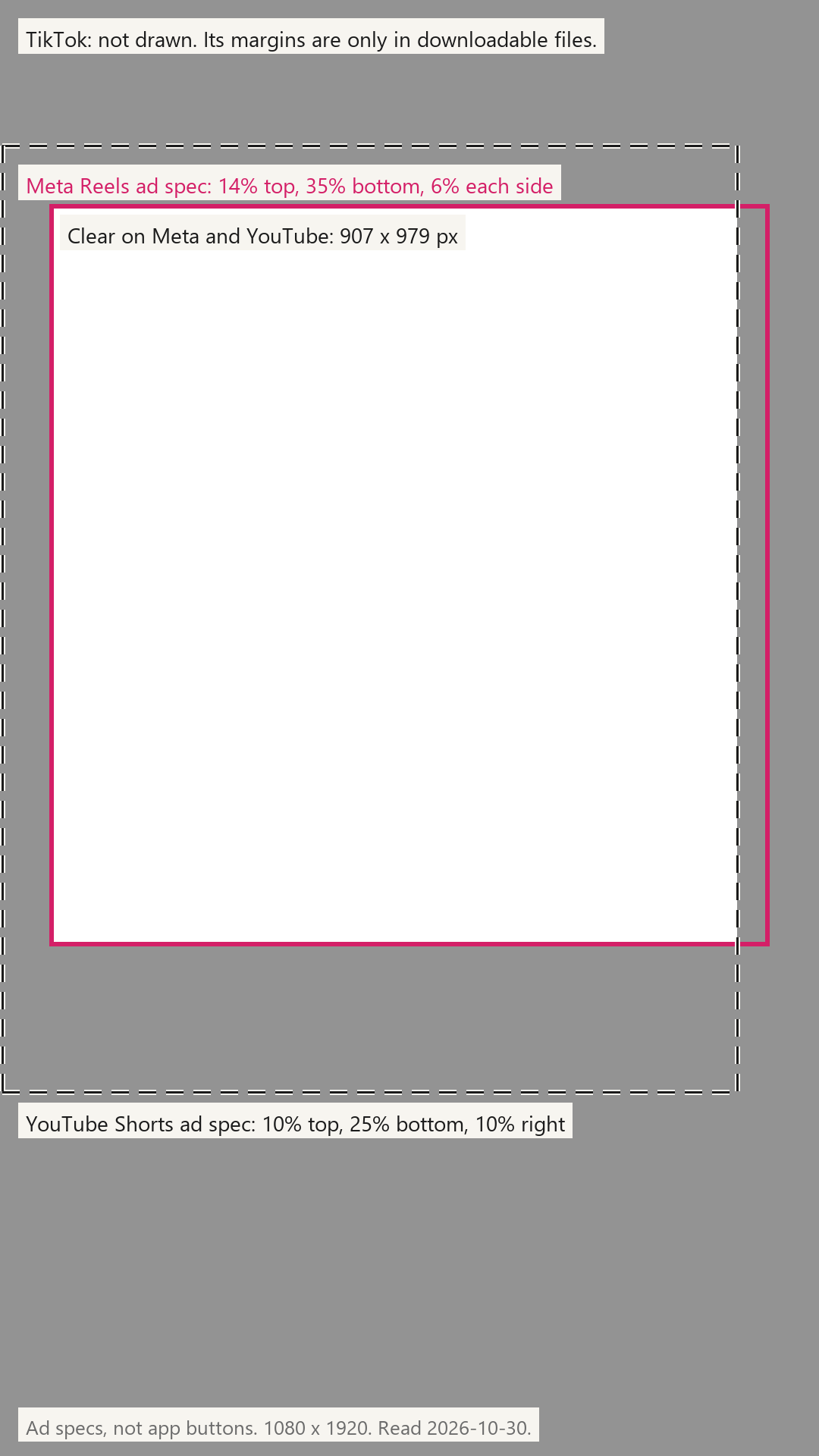
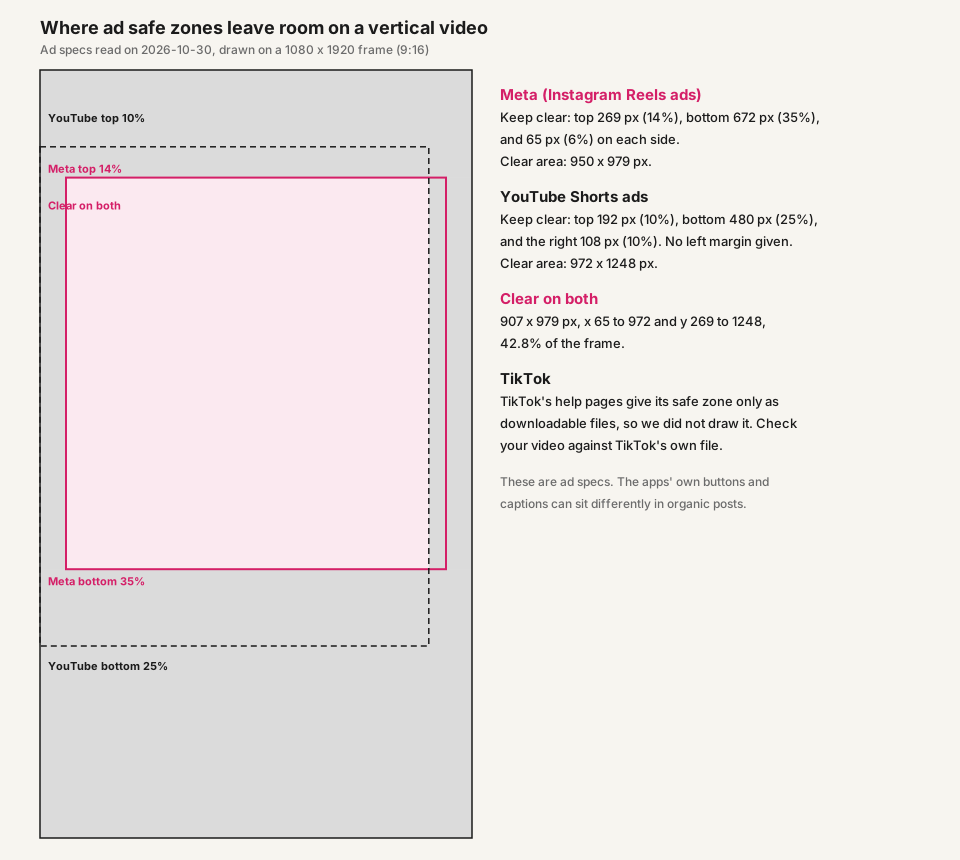
To check a frame, we suggest laying the overlay, or a 907 x 979 px rectangle at x 65, y 269, over a 1080 x 1920 frame in any editor and looking at what falls outside the clear area. Our drawing covers Meta and YouTube only; TikTok's own file is the one to use for TikTok.
Where we suggest putting the watermark on a vertical video
These choices are ours, not a platform rule:
- Put the mark inside the shared rectangle, between 65 and 972 px across and 269 and 1248 px down on a 1080 x 1920 frame. It then clears both ad specs.
- Keep it clear of the faces and text in your shot, inside that rectangle, at a low opacity so it does not compete with the picture.
- Check the result against TikTok's file if you post there, because the zone depends on the caption.
In the video watermark tool, you can drag the mark in the preview to place it anywhere, or pick a spot on the position grid. The Margin control goes up to 20% of the video frame width, which is 216 px on a 1080 px wide video, less than the 269 px top margin above, so we suggest dragging the mark rather than relying on a grid corner. Free: videos up to 60 seconds. Nothing of ours added. Pro removes the limit; your device sets the rest.
If you edit in CapCut first, our CapCut watermark guide covers adding your own mark there.
How we measured
Inputs were the margins printed on the pages linked above, read on October 30, 2026: Meta's Reels video ad page (top 14%, bottom 35%, each side 6%) and YouTube's Shorts ads page (top 10%, bottom 25%, right 10%, left not stated, taken as 0). TikTok gives its safe zone only as downloadable files and images, which we did not download or read, so no TikTok margin is drawn or claimed.
On a 1080 x 1920 frame each margin is the percent of that side, rounded half up to whole pixels. A platform's safe rectangle is the frame minus its margins, and the shared rectangle is where the two safe rectangles overlap. The drawing was made with Pillow 12.3.0. In the PNG overlay, the shared rectangle is transparent and everything outside it is shaded at 47% opacity.
We did not test TikTok's margins, ordinary (non-ad) posts, where the apps' buttons and captions can sit differently from the ad specs, caption length, TikTok's other ad formats, or phones with notches.
Sources
Checked October 30, 2026.
- ads.tiktok.com/help/article/tiktok-auction-in-feed-ads
- www.facebook.com/business/ads-guide/update/video/instagram-reels
- www.facebook.com/business/ads-guide/update/image/instagram-reels
- www.facebook.com/business/help/980593475366490
- help.instagram.com/1038071743007909
- business.google.com/us/ad-solutions/youtube-ads/shorts-ads
Questions
- What is the TikTok safe zone?
- For in-feed ads, TikTok says the safe zone depends on the video's dimension, the ad caption length and any additional formats, and publishes it as downloadable files. We state no TikTok percentages because its article gives none in text.
- What is the safe zone for Instagram Reels?
- For Reels ads, Meta's page says to consider leaving at least 14% of the top, 35% of the bottom and 6% on each side free of text and logos. That is an ad spec; on a 1080 x 1920 frame it is 269 px, 672 px and 65 px.
- What is the safe zone for YouTube Shorts?
- For Shorts ads, YouTube says to avoid the top 10%, the bottom 25% and the right-hand 10% of the frame: 192 px, 480 px and 108 px on a 1080 x 1920 frame.
- Do these ad margins apply to my ordinary video?
- The pages do not say. They are written for advertisers, so we treat them as a cautious guide for where to put a mark, not as a rule of the app.
- Where is one place that clears both the Meta and the YouTube ad spec?
- Inside a rectangle 907 px wide and 979 px tall on a 1080 x 1920 frame, from 65 to 972 px across and 269 to 1248 px down.